JPMC Blended Search
Unifying three distinct enterprise search experiences
Role
Senior UX Designer
Domain
Enterprise Systems, Data Search, AI-assisted workflows
Skills
Information architecture, search UX, interaction design, data analysis, complex logic mapping, prototyping, stakeholder alignment
Overview
Party Central supported three distinct search experiences—Generic Search, Advanced Search, and Advanced New. Each served a legitimate purpose, but each had evolved with its own interface, criteria, search behavior, and data sources.
The result exposed too much of the underlying system to users. Before beginning a search, Ops users often had to understand which search experience—and which configuration within it—best supported the task.
My goal was to help bring those capabilities into one cohesive, scalable search experience: start simply, preserve the power of specialized search, and reveal additional capabilities as the user's intent became clearer.
The initiative also introduced an AI-assisted search concept, allowing users to express multi-parameter searches in natural language rather than construct every query manually.
The Challenge
Three search experiences had become three different mental models
Generic Search supported fast lookup. Advanced Search introduced structured criteria, entity and identifier options, and extended internal search. Advanced New added broader source selection and additional configurations.
The problem wasn't simply that there were three interfaces.
Users had to understand the architecture of Party Central before they could effectively use it.
Switching between searches was explicit, the available criteria changed from one experience to another, and Advanced and Advanced New contained additional internal configurations based on entity type, identifiers, criteria, and data sources. The current-state experience effectively asked users to adapt to the system rather than allowing the system to adapt to the task.
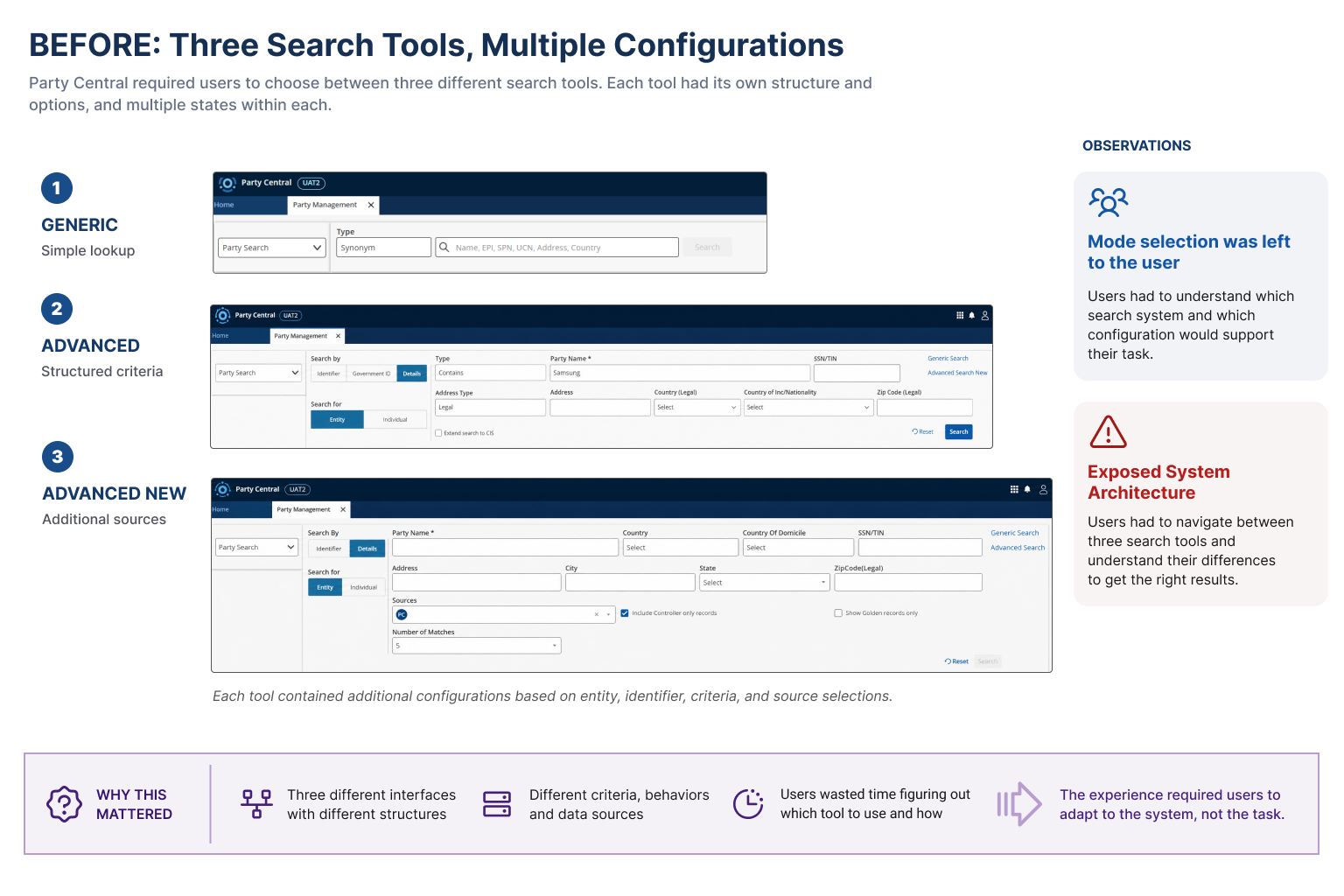
Three separate search experiences exposed different structures, options, and internal configurations.
What the Evidence Showed
Different search tools were serving different intents
Usage data helped explain why simply eliminating Advanced or Advanced New wasn't the answer.
In Advanced Search, identifier lookup represented 62% of searches, while name searches accounted for 38%. More than 93% of searches remained within Party Central's internal data.
Advanced Search New showed almost the opposite pattern: 95.8% were name searches, and 99.8% used expanded sources such as CIS, BVD, GLEIF, BBG, or other source combinations.
The data reinforced an important design principle:
The specialized capabilities were valuable. The burden of choosing between them was not.
Rather than flatten every search into one overloaded interface, the new experience needed to preserve these distinct capabilities while reducing how much users had to understand up front.
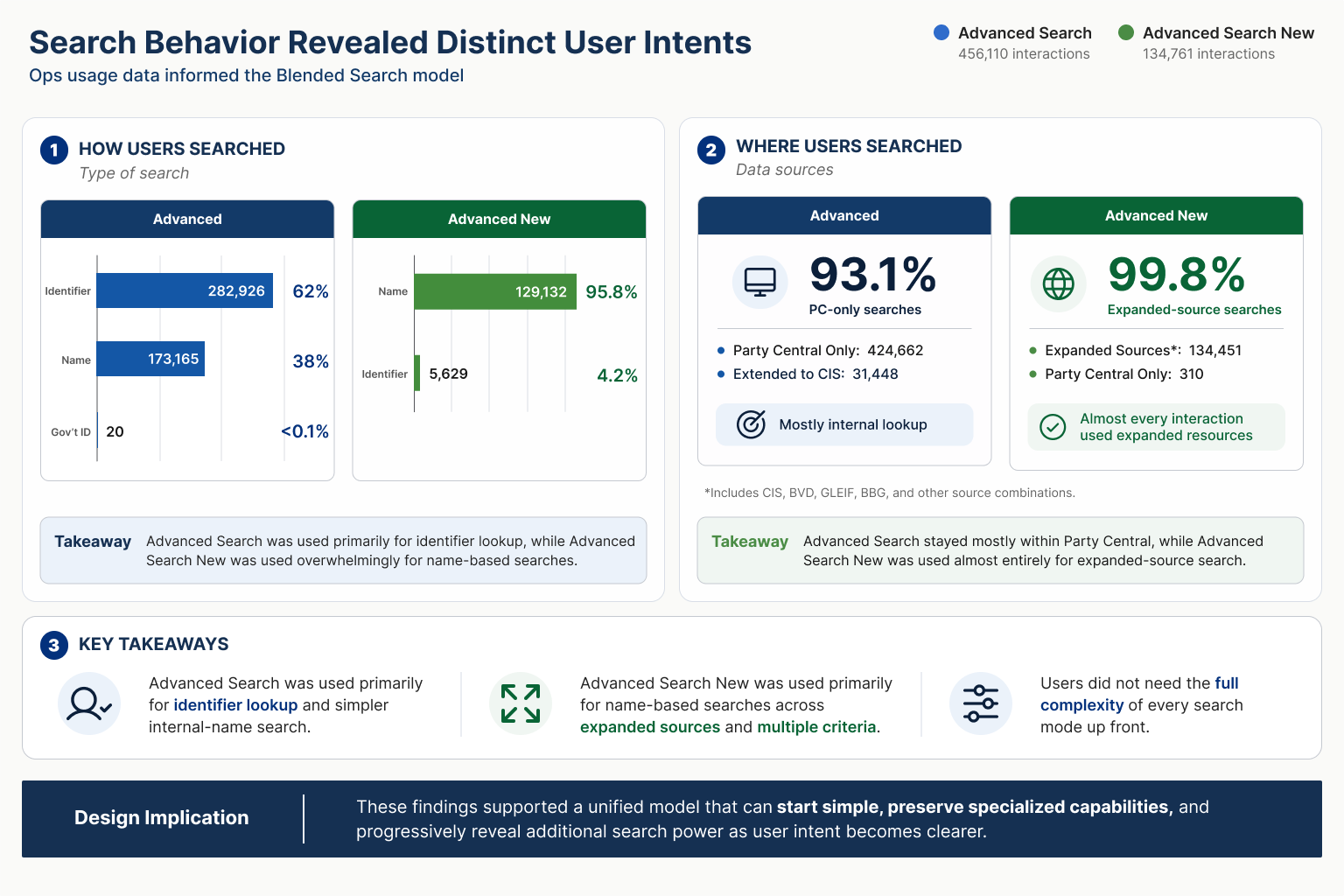
Existing usage patterns showed clear differences in search intent and data-source needs.
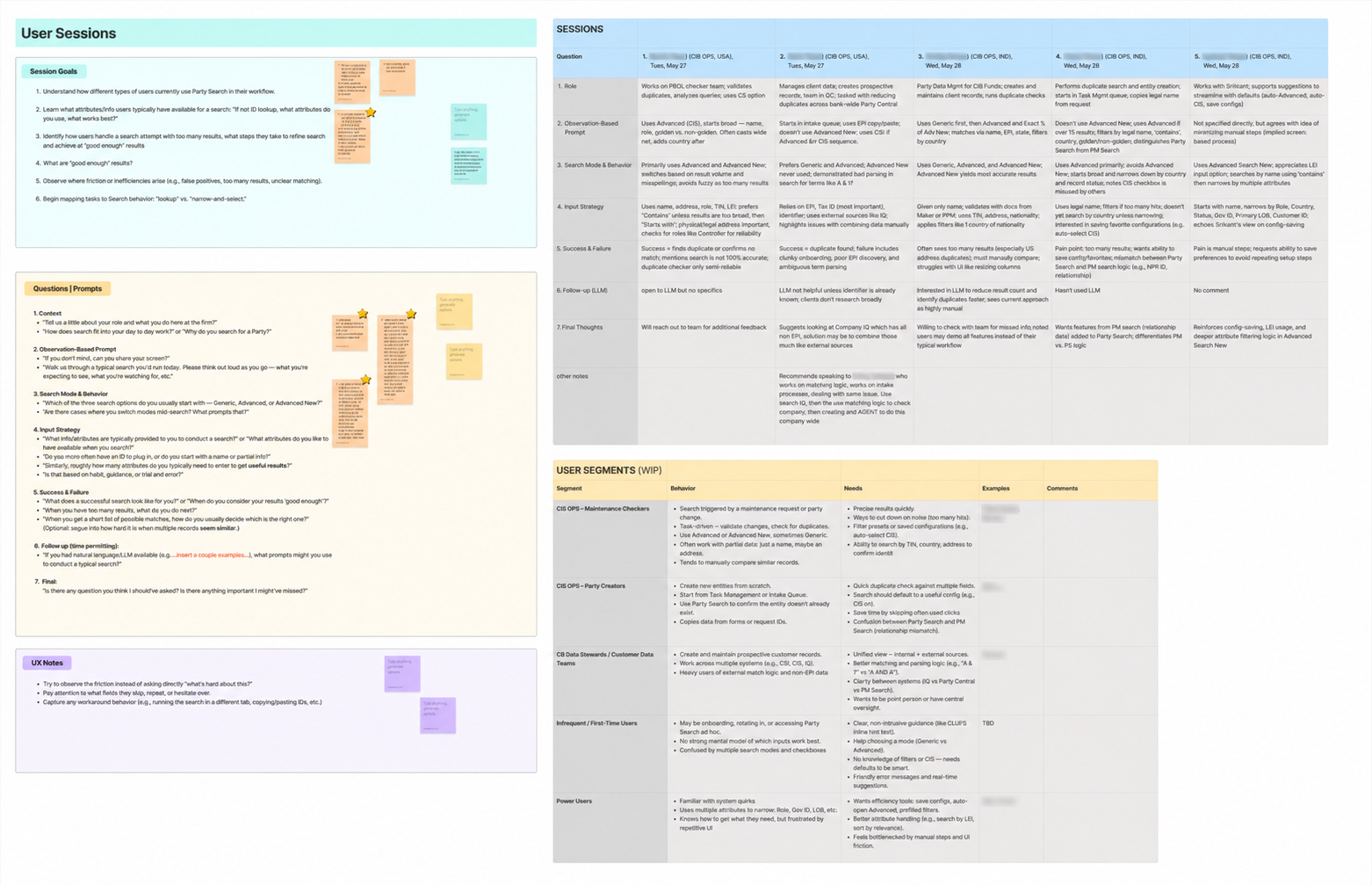
User Interviews: questionnaire development, session notes, synthesis, and emerging user segments
Product Direction
Blended Search was part of a broader Party Search modernization effort developed with Product and Technology.
The initiative combined three related goals:
Unify the search experience.
Bring Generic, Advanced, and Advanced New into a common interaction model rather than requiring users to navigate between separate search pages.
Expand what users could search.
Support additional party attributes and richer combinations of criteria without continually adding new standalone search experiences.
Explore natural-language search.
Allow users to express multiple search parameters in a simple statement while translating that intent back into Party Central's structured search capabilities.
The AI work was deliberately additive. The product concept retained deterministic search as a fallback when natural-language interpretation was inaccurate, rather than making AI a replacement for established enterprise-search controls.
Designing the Unified Search Model
Start simple. Reveal complexity when the task requires it.
The central interaction problem became:
How can one experience support quick lookup, structured search, and expanded-source investigation without asking users to choose the correct mode before they begin?
I developed an adaptive model in which Generic Search became the common starting point, while user actions progressively revealed the capabilities previously associated with Advanced and Advanced New.
A simple lookup could remain simple.
Adding structured criteria, changing entity context or match behavior, or extending the search to additional internal data could move the experience into Advanced capabilities.
Requesting external sources could expose the capabilities previously contained within Advanced New.
The important shift was conceptual:
Search modes became system behavior rather than destinations.
Users could focus on what they were trying to find while business rules, data eligibility, and interaction state determined which capabilities were needed behind the scenes.
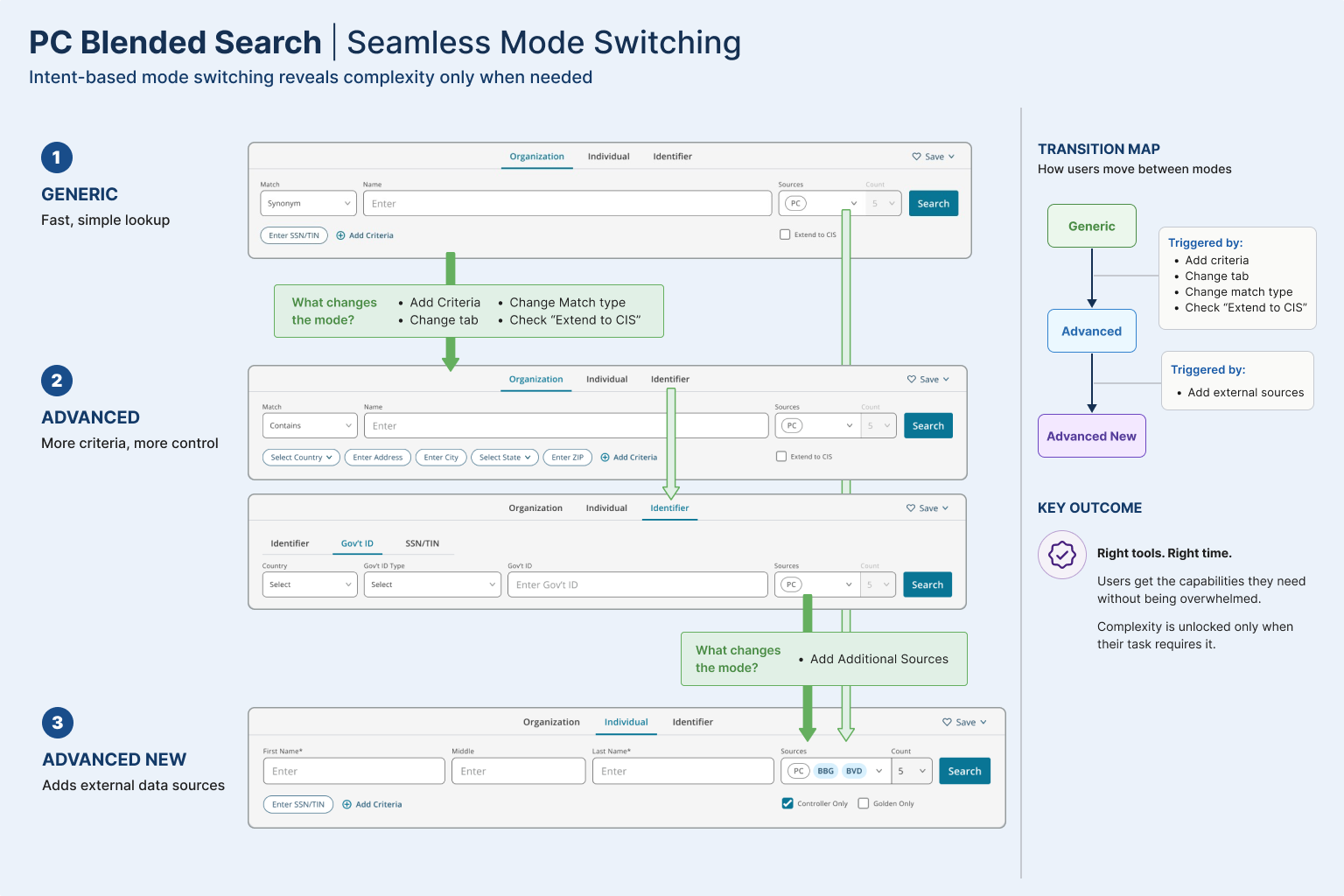
The model captures four principles:
Intent-driven behavior — respond to what the user is trying to accomplish.
Progressive disclosure — reveal advanced capabilities only when needed.
Business rules behind the scenes — apply enterprise policies and data eligibility without making users manage them manually.
Continuity — preserve entered criteria and context as the experience evolves.
Those principles are explicit in the mode-switching model.
From Model to Interaction
A logic diagram can describe the system, but the design needed to feel continuous in use.
As users added criteria or expanded their search scope, the interface revealed the corresponding capabilities in place, rather than sending them to a different search page and forcing them to reconstruct the query.
This allowed a search to grow naturally with the task:
Simple lookup → structured search → expanded-source investigation
without requiring the user to understand those as three separate products.
[VIDEO pending]
The search experience progressively expands as additional criteria and data sources are requested.
Designing the Edge Cases
Enterprise search rarely fails on the happy path. Much of the detailed design work involved defining what happened as criteria, validation, eligibility, and system state changed.
I documented those behaviors directly in Figma, including validation states and interaction rules needed to keep the experience understandable as its capabilities expanded.
The goal was not only to design the interface, but to make the underlying behavior explicit enough for Product and Engineering to implement consistently.
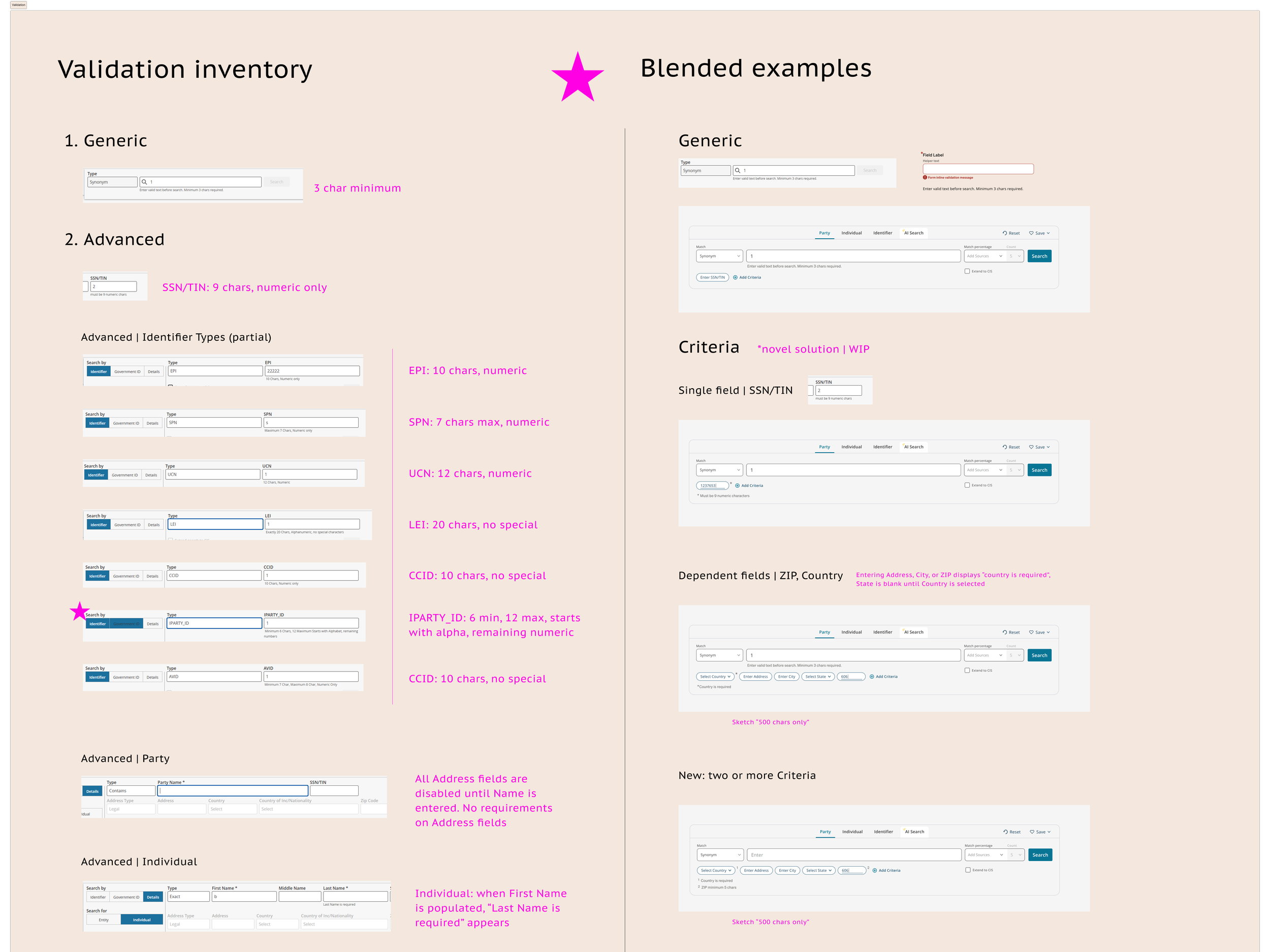
Detailed states translated the search model into implementable interaction behavior.
AI-Assisted Search
Natural language as another way into structured search
A parallel part of the initiative explored Party Central's first AI-assisted search experience.
Instead of manually constructing a query field by field, users could write requests such as:
“Active Apollo parties in Luxembourg”
and have the system identify relevant search parameters before retrieving results.
The initial concept deliberately limited the supported parameter set and was designed to expand over time. The product roadmap envisioned additional attributes and eventually relationship and vendor data.
I treated AI as an input layer over trusted enterprise search, not a replacement for it.
That distinction mattered. Users still needed predictable results, structured controls, and a path back to conventional search if the interpretation was inaccurate. The fallback was part of the product concept itself.
[Image Pending]
Outcome
Blended Search established a UX model for bringing three previously distinct search experiences into one adaptive system while preserving the specialized capabilities that usage data showed users genuinely relied on.
The work:
replaced explicit mode selection with an intent-driven interaction model;
preserved structured and expanded-source search rather than flattening them into a lowest-common-denominator experience;
created a scalable framework for introducing additional criteria and data sources;
translated complex mode and validation logic into detailed implementation guidance; and
provided a UX foundation for integrating natural-language search alongside deterministic enterprise search.
The challenge wasn't eliminating complexity. It was deciding which complexity users needed to manage, and which complexity the system could absorb for them.
